Hey guys!
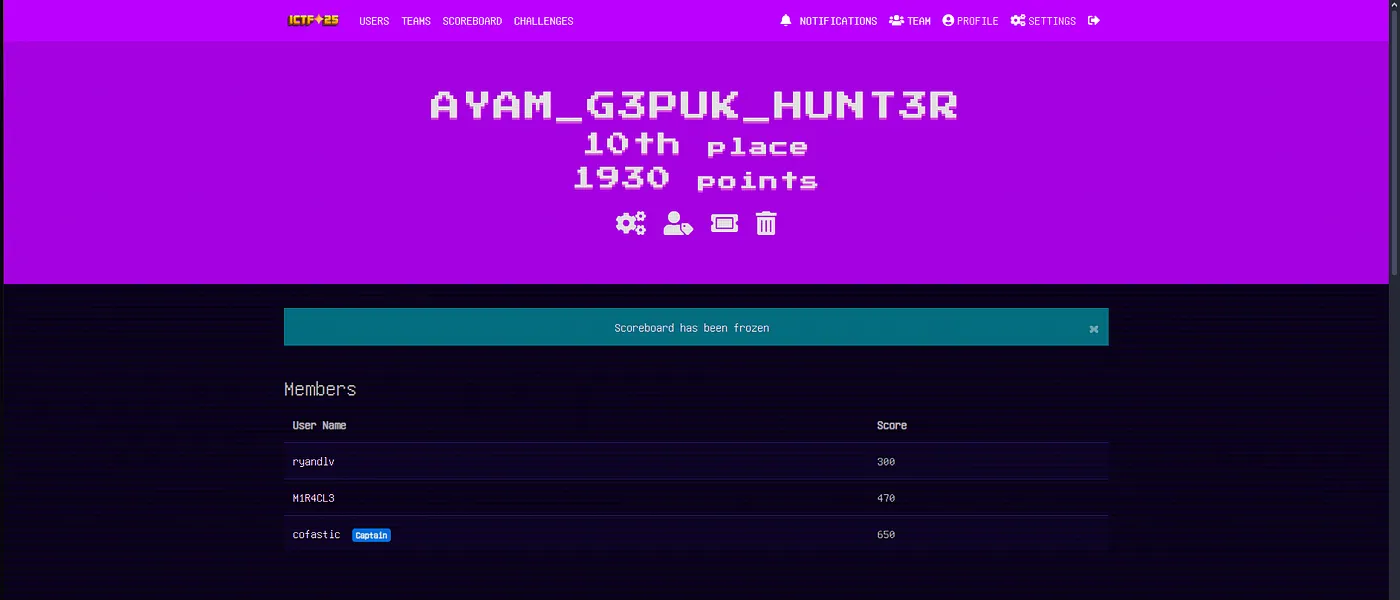
Me and my team recently had the opportunity to participate in ICTF 2025, hosted by FSEC-SS APU. It was an exciting competition with a diverse range of challenges spanning forensics, steganography, web exploitation, PWN, and reverse engineering. I even managed to place top 10! Below are writeups for the challenges I managed to solve.
Web Exploitation
Stargazers
 Stargazers Challenge
Challenge Description:
Catching stars is incredible. All you need to do is collect seven of them, and I will give you the reward.
Upon opening the challenge, I found a simple browser-based game where I needed to click on stars to increase my score. The objective was to collect 7 stars to receive a flag.
However, I noticed something interesting when I reached a score of 6 — the 7th star became "unclickable" and would actively move away from my cursor. This made it virtually impossible to reach the required score of 7 through normal gameplay.
I decided to inspect the page's source code to understand the game mechanics. Upon reviewing the code, I identified a client-side validation vulnerability. The game fully relies on client-side JavaScript to track and validate the player's score. When the score reaches 7, the game sends a POST request to the /victory endpoint to retrieve the flag.
The key insight here is that the server has no way to verify whether the player actually played the game legitimately. The score is tracked entirely on the client side in a JavaScript variable that can be easily manipulated.
Since the issue was clearly a client-side validation problem, I could bypass the game mechanics entirely by directly sending the victory request with a manipulated score value.
I opened the browser's developer console (F12) and executed the following code:
javascriptfetch('/victory', {
method: 'POST',
headers: {
'Content-Type': 'application/json',
},
body: JSON.stringify({ score: 7 }),
})
.then(response => response.json())
.then(data => console.log(data.message));
The server accepted my fabricated score of 7 and returned the flag:
FLAG{ICTF25{0e9ce052105ac660739950879a243734615e41baca30fa2892646f3bc9307c8e}}
Sweet & Sour Sauce
 Sweet & Sour Sauce Challenge
Challenge Description:
Welcome to the ultimate scavenger hunt! Someone's left a trail of digital breadcrumbs across this seemingly simple web app. A curious user might notice a few oddities here and there — maybe even enough to piece together something… valuable. But be warned: not everything is where it seems, and not everything is what it claims to be. You'll need to look deeper, explore creatively, and think like someone who hides things for fun.
The challenge was described as a "scavenger hunt," so I knew I would need to look in various places to find different pieces of a flag.
When I first accessed the website, I found a simple page with two buttons: "Click me for a surprise!" and "Check the Mirror". The page also had some hints about keeping eyes open and cookies.
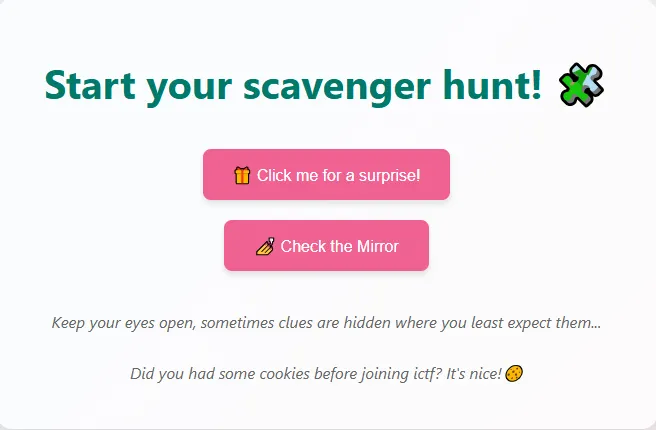 Main Page
Part 1 - HTML Source Code:
First, I checked the HTML source code of the main page. This is always a good practice for web challenges. I found the first part of the flag hidden in a comment: ICTF25{h3r3
Part 2 - Cookies:
The main page had a hint: "Did you had some cookies before joining ictf? It's nice!🍪"
This was a clear indication to check the cookies. Looking at the site's cookies, I found a JWT token:
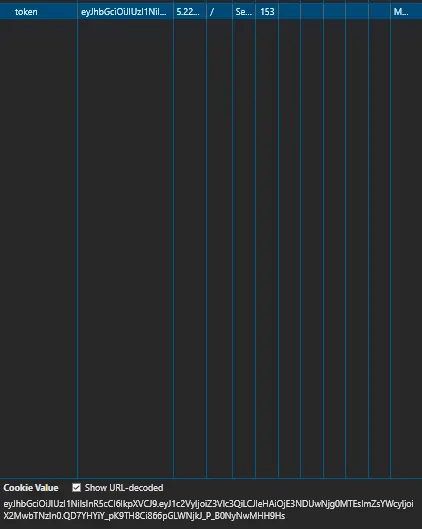 JWT Token in Cookies
eyJhbGciOiJIUzI1NiIsInR5cCI6IkpXVCJ9.eyJ1c2VyIjoiZ3Vlc3QiLCJleHAiOjE3NDUwNjg0MTEsImZsYWcyIjoiX2MwbTNzIn0.QD7YHYiY_pK9TH8Ci866pGLWNjkJ_P_B0NyNwMHH9Hs
I decoded this JWT token using CyberChef and found the second part of the flag: _c0m3s
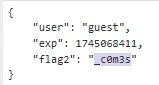 JWT Decoded
Part 3 - Configuration Files:
After exploring further and finding the /admin page from the robots.txt file, I saw another clue suggesting to check for common configuration files. I tried several options and found that /config.js was accessible.
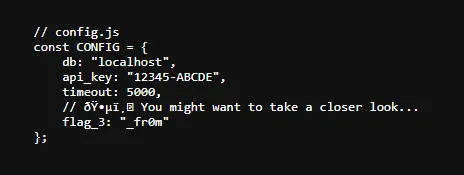 Config.js File
This gave me the third part of the flag: _fr0m
Part 4 - HTTP Response Headers:
I clicked on the "Check the Mirror" button, which took me to the /mirror endpoint. The page had a hint within:
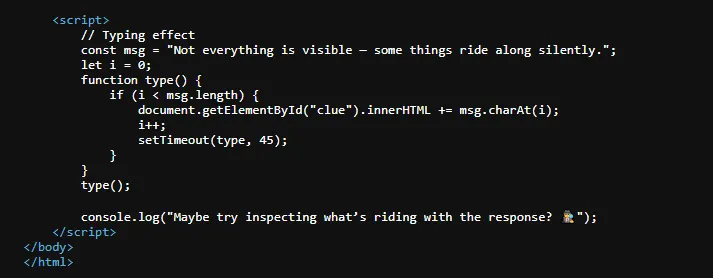 Mirror Page
The console.log message suggested to inspect what's "riding with the response". This was a hint to check HTTP response headers.
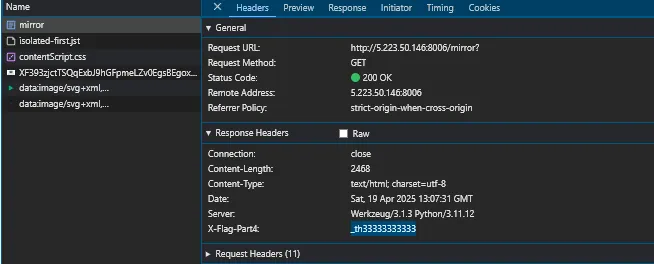 Response Headers
In the response headers when accessing the /mirror endpoint, I found a custom header containing the fourth part of the flag: _th33333333333
Part 5 - robots.txt:
A common place to check in web challenges is the robots.txt file, which often contains hidden information or paths. When I accessed this file, I found:
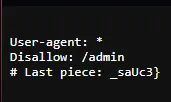 robots.txt
This gave me the final part of the flag: _saUc3}
Putting all the pieces together in the order they were numbered:
- ICTF25{h3r3
- _c0m3s
- _fr0m
- _th33333333333
- _saUc3}
FLAG{ICTF25{h3r3_c0m3s_fr0m_th33333333333_saUc3}}
Glitch in the Query
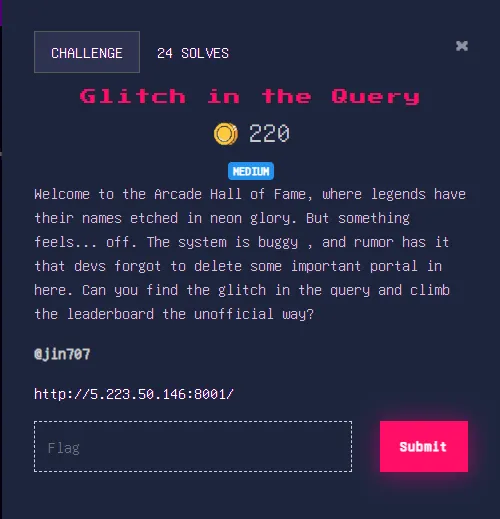 Glitch in the Query Challenge
Challenge Description:
Welcome to the Arcade Hall of Fame, where legends have their names etched in neon glory. But something feels… off. The system is buggy, and rumor has it that devs forgot to delete some important portal in here. Can you find the glitch in the query and climb the leaderboard the unofficial way?
Upon accessing the challenge URL, I was greeted with a login page.
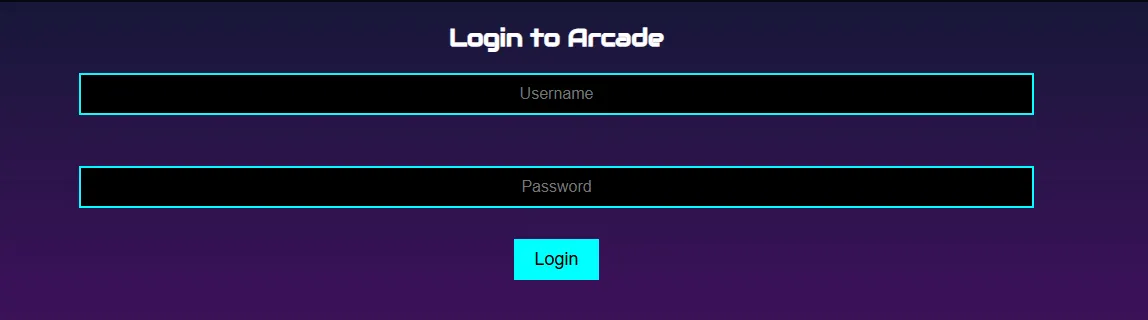 Login Page
The challenge name "Glitch in the Query" immediately suggested that this might be vulnerable to SQL injection. Since there was no registration option, I tried to bypass the login using SQL injection.
I attempted a classic SQL injection payload in the username field: ' OR '1'='1
This injection works by making the WHERE clause in the SQL query always evaluate to true, regardless of whether the username and password match.
After successfully bypassing the login, I was presented with an arcade leaderboard page showing various player names and their scores.
 Leaderboard Page
The page had a search feature with a GET parameter called "query" that allowed searching for player names, which looked suspiciously like another SQL injection point.
 Search Feature
This form accepted a query parameter, which suggested it might be directly passing user input to a SQL query without proper sanitization.
First, I needed to determine what tables existed in the database. I entered: SHOW TABLES;
This returned the following result:
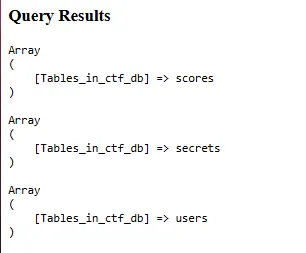 Tables List
This confirmed my suspicion that the query input was vulnerable to SQL injection and revealed the existence of three tables: scores, secrets, and users.
The secrets table caught my attention immediately, as it's not something you'd expect to find in a normal arcade leaderboard system.
I then queried the secrets table to see what it contained: SELECT * FROM secrets
This returned:
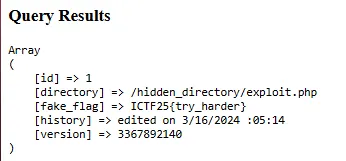 Secrets Table Contents
It revealed a hidden directory path (/hidden_directory/exploit.php) and a fake flag.
I navigated to the path provided by the query. This led me to what appeared to be an admin terminal interface:
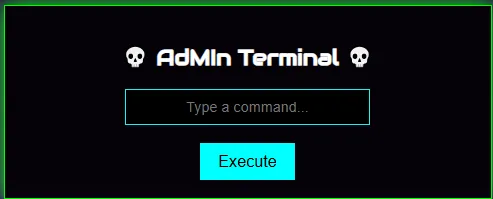 Admin Terminal
This terminal appeared to allow execution of system commands, which represented a significant escalation from SQL injection to command execution.
I started with a basic command to list the contents of the current directory using ls.
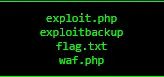 ls Command Result
Seeing the flag.txt is within the working directory, I tried to read it using cat flag.txt.
 Blocked Command
But this returned "Blocked Command", suggesting there was some form of Web Application Firewall (WAF) as we see a waf.php inside the directory as well.
To understand what was being blocked, I navigated to the exploitbackup file, which revealed the PHP code of the exploit page. This confirmed my suspicion that there was a WAF filtering commands. The code showed that commands were being checked with a check_waf() function before execution.
Since cat was blocked, I needed to find an alternative way to read the flag file. In Unix-like systems, there are multiple commands that can read file contents.
I tried doing more flag.txt. This command succeeded and displayed:
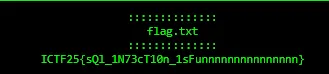 Flag Retrieved
FLAG{ICTF25{sQl_1N73cT10n_1sFunnnnnnnnnnnnnnn}}
Forensics
You See What You See
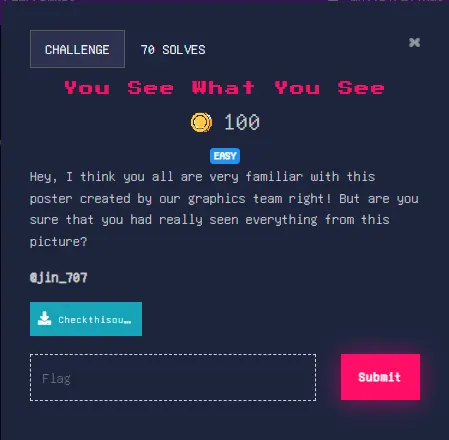 You See What You See Challenge
Challenge Description:
Hey, I think you all are very familiar with this poster created by our graphics team right! But are you sure that you had really seen everything from this picture
The challenge came with an image file named Checkthisout.png. The title "You See What You See" along with the description's hint about seeing "everything from this picture" immediately suggested this was a steganography challenge.
Upon first glance, the image appeared to be a normal poster or graphic created for the CTF event. There were no obvious visual clues or distortions that would indicate hidden information.
 Challenge Image
Given that this was classified as an easy challenge and the description hinted at hidden content, I began by investigating the metadata of the image.
For steganography challenges, one of the first steps is to check the metadata of the file. This information can often contain hidden messages or clues. I used the exiftool -a Checkthisout.png command to extract all metadata from the image.
I immediately noticed several interesting fields in the metadata:
- License: SUNURjI1e0szM3Bf
- Keywords: RzAxbkchfQ==
Both of these strings had characteristics of Base64 encoding (ending with = characters which hints padding and containing a mix of uppercase letters, lowercase letters, and numbers).
Base64 is a common encoding scheme used to represent binary data in an ASCII string format. Recognizing the potential Base64 encoded strings in the metadata, I proceeded to decode them using CyberChef:
For the License field:
echo "SUNURjI1e0szM3Bf" | base64 -d
ICTF25{K33p_
ICTF25{K33p_
This was clearly the first part of the flag.
For the Keywords field:
echo "RzAxbkchfQ==" | base64 -d
G01nG!}
codeG01nG!}
This appeared to be the second part of the flag.
Putting both decoded parts together:
FLAG{~~ICTF25{K33p_G01nG!}~~}
---
### What Is The Routine
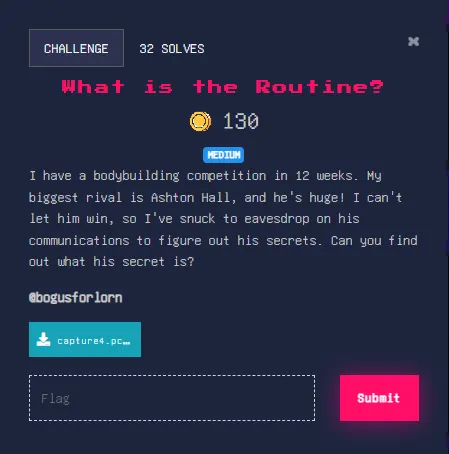
**Challenge Description:**
> I have a bodybuilding competition in 12 weeks. My biggest rival is Ashton Hall, and he's huge! I can't let him win, so I've snuck to eavesdrop on his communications to figure out his secrets. Can you find out what his secret is?
The challenge provided a packet capture file named **capture4.pcapng**.
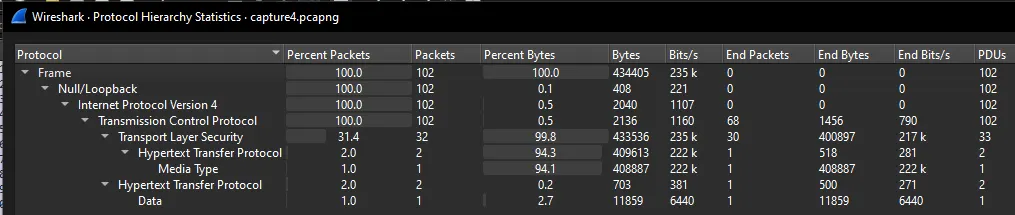
I started by opening the PCAP file in Wireshark. Upon opening the file, I checked the Protocol Hierarchy Statistics and noticed that TLS traffic dominated the capture, accounting for approximately 99.8% of the bytes. This immediately indicated that most of the traffic was encrypted and would need to be decrypted to access the useful information.
Since we needed to decrypt the TLS traffic, I began searching for any potential TLS session keys that might have been captured. In Wireshark, I navigated to **File > Export Objects > HTTP**.
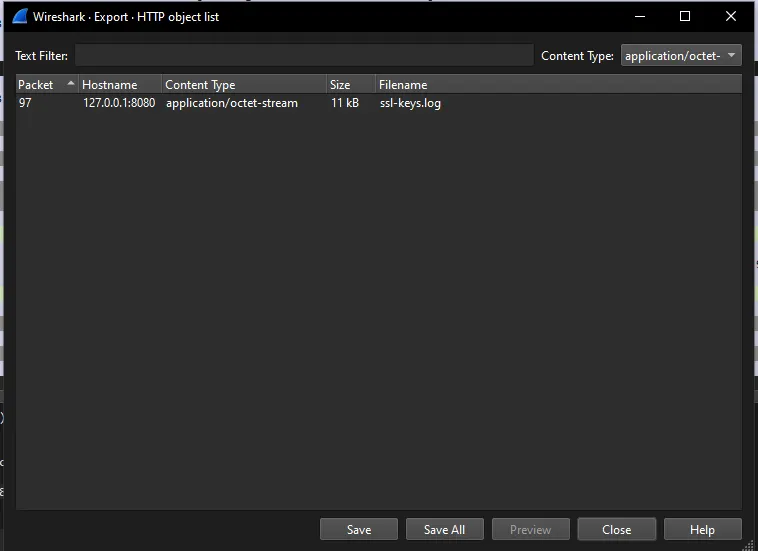
This revealed an interesting file named **ssl-keys.log** which can be found in frame 93. This type of file contains pre-master secrets that can be used to decrypt TLS sessions. I exported this file as **key.txt** on my local machine.
To use the key file for decryption, I configured Wireshark's TLS settings: **Edit > Preferences > Protocols > TLS**
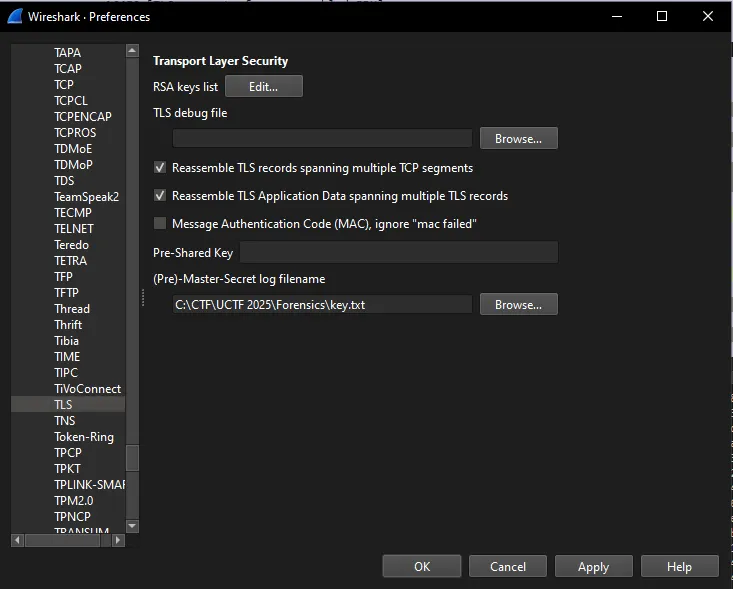
In the settings dialog, I:
1. Added the path to the **key.txt** file in the "(Pre)-Master-Secret log filename" field
2. Checked "Reassemble TLS records spanning multiple TCP segments"
3. Checked "Reassemble TLS application data spanning multiple TLS records"
4. Clicked "OK" to apply the settings
After applying these settings, Wireshark was able to decrypt the TLS traffic, making the previously encrypted data visible for analysis.
With the TLS traffic now decrypted, I returned to the HTTP object list: **File > Export Objects > HTTP**
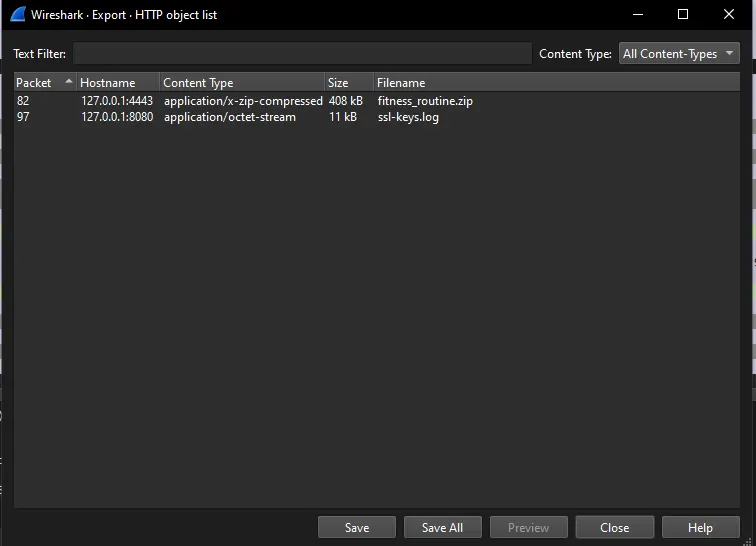
This time, I found a new file that wasn't visible before: **fitness_routine.zip**. I exported this file to my local machine.
I extracted the contents of **fitness_routine.zip**, which revealed four files:
1. **Cavendish_Banana_DS.jpg**
2. **ice.jpg**
3. **Saratoga_water.jpg**
4. **my 3 am routine.txt**
The text file contained a series of number pairs, with each line having a timestamp (Unix epoch format) followed by a hexadecimal value.
Next, I examined each image for potential hidden information:
1. **Cavendish_Banana_DS.jpg**: I ran the **strings** command on this image and found a hidden message: "Make sure to follow the steps IN ORDER correctly"
2. **ice.jpg**: Didn't reveal anything in this image.
3. **Saratoga_water.jpg**: This image appeared to have data hidden using steganography. I used **steghide extract -sf Saratoga_Water.jpg** to extract the hidden content.
The tool didn't require a passphrase (just pressed Enter) and successfully extracted a file named **embed.txt** with the message: "Follow these steps at the instructed TIME"
The clues from the images pointed to the importance of "TIME" and "ORDER" in interpreting the data from the text file that was provided. The timestamp in each line of **my 3 am routine.txt** likely indicated the correct order for processing the hexadecimal values.
I needed to:
1. Sort the lines from the text file by their timestamps (ascending order)
2. Convert each hexadecimal value to its ASCII representation
3. Concatenate these ASCII characters to form the flag
So, I wrote a Python script just to do that:
```python
data = [
(1742876236, "68"),
(1742889076, "69"),
(1742874976, "46"),
(1742874856, "54"),
(1742878516, "49"),
(1742882596, "6d"),
(1742894236, "00"),
(1742881636, "33"),
(1742883496, "4e"),
(1742894776, "00"),
(1742884096, "39"),
(1742883796, "6e"),
(1742894296, "00"),
(1742881576, "5f"),
(1742894596, "00"),
(1742883436, "72"),
(1742885536, "5f"),
(1742882476, "48"),
(1742875276, "35"),
(1742894716, "00"),
(1742883616, "49"),
(1742874736, "49"),
(1742875456, "7B"),
(1742888416, "37"),
(1742892916, "00"),
(1742894116, "00"),
(1742876476, "33"),
(1742890876, "00"),
(1742894476, "00"),
(1742875216, "32"),
(1742877496, "72"),
(1742877736, "5F"),
(1742887876, "30"),
(1742882536, "5f"),
(1742889616, "33"),
(1742893576, "00"),
(1742889376, "4e"),
(1742880616, "32"),
(1742882836, "30"),
(1742893516, "00"),
(1742892196, "00"),
(1742887816, "72"),
(1742891716, "00"),
(1742892316, "00"),
(1742888176, "75"),
(1742890036, "7d"),
(1742881636, "37"),
(1742874796, "43"),
(1742890996, "00"),
(1742877616, "33")
]
# Sort by timestamp
data.sort()
# Convert hex to ASCII (skip nulls)
flag = ''.join(chr(int(h, 16)) for _, h in data if h != "00")
# Print the result
print("Flag:", flag)
After running the script, I got the flag:
FLAG{ICTF25{h3r3_I2_37H_m0rNIn9_r0u7iN3}}
OSINT
Space Explorer
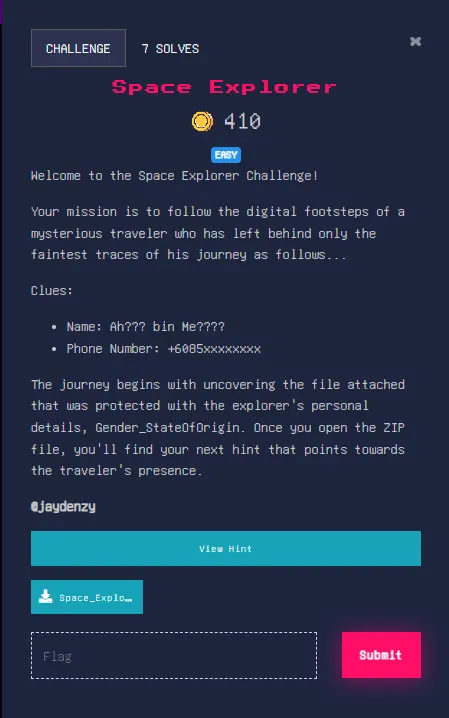 Space Explorer Challenge
Challenge Description:
Welcome to the Space Explorer Challenge! Your mission is to follow the digital footsteps of a mysterious traveler who has left behind only the faintest traces of his journey as follows…Clues: Name: Ah??? bin Me???? Phone Number: +6085xxxxxxxxThe journey begins with uncovering the file attached that was protected with the explorer's personal details, Gender_StateOfOrigin. Once you open the ZIP file, you'll find your next hint that points towards the traveler's presence.
The challenge provided some partial information about our mysterious space explorer:
- A partially redacted name: "Ah??? bin Me????"
- A partially redacted phone number: "+6085xxxxxxxx"
- A hint that the ZIP file was protected with a password in the format "Gender_StateOfOrigin"
First, I focused on the phone number prefix. The "+6085" country code and area code combination is specific to Malaysia, particularly to the state of Sarawak. This gave me the "StateOfOrigin" part of the password.
For the gender, the use of "bin" in the name is a strong indicator. In Malaysian naming conventions, "bin" (meaning "son of") is used exclusively for males, while "binti" would be used for females. This confirmed that the gender was "Male".
Combining these clues, I attempted to unlock the ZIP file with the password: Male_Sarawak
This password worked, confirming my analysis of the initial clues. Inside the ZIP file, I found an image:
 Space Explorer Image
The image had a social media handle @gkenyalang visible in the bottom right corner of the image.
I began searching for this handle across various social media platforms and found an active account on Twitter: https://x.com/gkenyalang
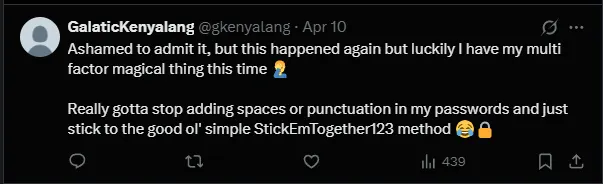
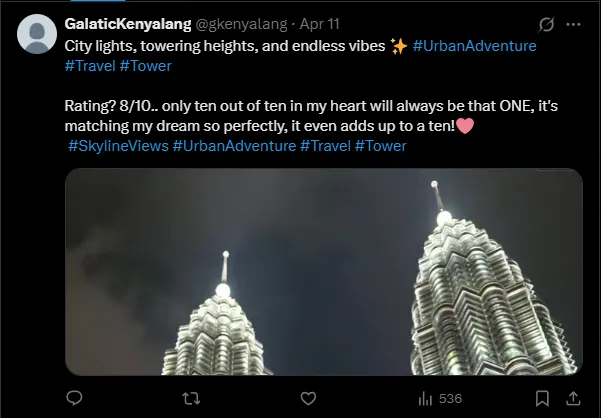
The account belonged to someone who appeared to have an interest in towers, particularly in Malaysia. Several tweets caught my attention:
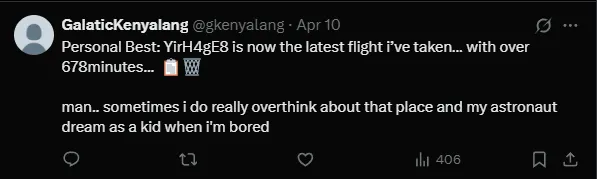 Tweet 1
 Tweet 2
 Tweet 3
The string "YirH4gE8" from the first tweet, combined with the emojis, suggested this might be a Pastebin ID. The emojis hinted at clipboard = paste and trashbin = bin.
I navigated to: https://pastebin.com/YirH4gE8
This led to a password-protected Pastebin entry.
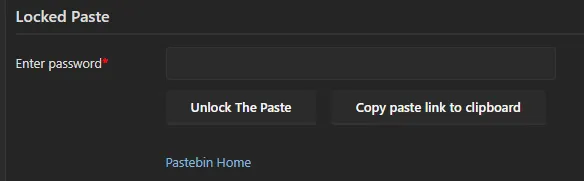 Password Protected Pastebin
Based on the tweets, I needed to identify what tower was the person's favorite, as they mentioned: "only ten out of ten in my heart will always be that ONE."
The profile's location was set to "Merdeka," and the tweet mentioned something that "adds up to a ten." After some research, I realized this was referring to Merdeka 118, a skyscraper in Kuala Lumpur that:
- Is taller than the KLCC Petronas Towers
- Has a name where the numbers add up to 10 (1+1+8=10)
- Matches with the "ONE" emphasized in the tweet
Remembering the password hint from the second tweet about "StickEmTogether123" (avoiding spaces and punctuation), I tried: Merdeka118 as the Pastebin password.
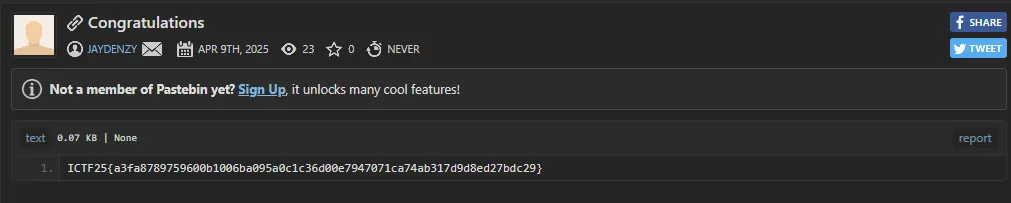 Pastebin Unlocked
The password worked, and the Pastebin content revealed the flag:
FLAG{ICTF25{a3fa8789759600b1006ba095a0c1c36d00e7947071ca74ab317d9d8ed27bdc29}}
ICTF 2025 was such an incredible journey of learning and getting humbled. Placing in the top 10 out of 140 other teams was an very exciting achievement, but the real value came from the knowledge gained and skills sharpened during the competition.
I'd like to express my gratitude to FSEC-SS APU for hosting such a well-organized event, and to all the challenge creators for their creativity and effort in designing these engaging challenges.
Looking forward to participating in future CTF competitions.
P.S If you are interested in getting a hold of the challenge files you can get them over at my GitHub!